Creating an email signature for one person is easy.
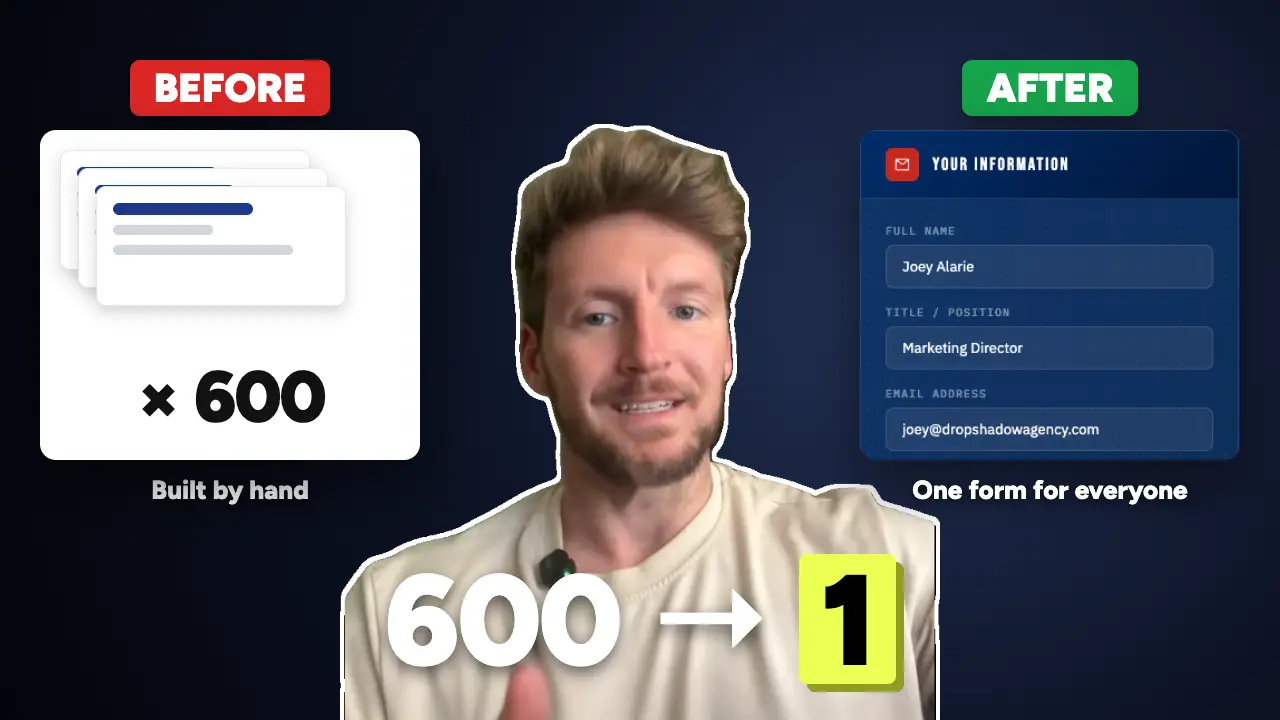
Creating a consistent email signature for approximately 600 employees across seven locations is a different challenge.
I ran into this situation while working on a client project at DropShadow Agency.
The client needed an updated email signature design that employees could personalize with their own contact information.
The design itself wasn’t particularly complicated.
The challenge came after the design was approved.
How were we going to get 600 people to use the same signature without manually creating hundreds of individual versions?
Instead of taking on all that repetitive work, I used Claude AI to help build a custom email signature generator.
Here’s how the project came together.
The Problem: One Design, Hundreds of Employees
The client had approximately 600 employees spread across seven locations.
Each employee needed a signature that followed the approved company design while displaying their individual information.
That included:
- Name
- Job title
- Email address
- Office phone number
- Cell phone number
- Office location
The company wanted consistency, but the signatures couldn’t all be identical.
Each employee had different information.
And manually creating a separate HTML signature for every person wasn’t an attractive option.
The Three Approaches I Considered
Before building anything, I looked at three practical ways to handle the project.
Option 1: Use a Paid Email Signature Management Platform
There are software platforms specifically designed to manage email signatures across organizations.
These can be useful for companies that need centralized control, automatic deployment, compliance requirements, or frequent organization-wide updates.
For some businesses, a dedicated platform is the right choice.
But it also introduces another software product to evaluate, purchase, configure, and maintain.
I wanted to see whether the client’s immediate needs could be handled with something simpler.
Option 2: Create Every Signature Manually
Another approach would be to take the approved design and create a separate version for each employee.
Technically, that’s possible.
But with 600 employees, it would mean managing hundreds of names, titles, phone numbers, and locations.
And if someone changed their job title or phone number, their signature would need updating.
I didn’t want to build a process that depended on someone manually repeating the same task hundreds of times.
Option 3: Give Employees a Template to Customize
The third approach was to provide the approved design and let each employee edit their own signature.
This would reduce the workload for whoever was distributing the signatures.
But it would also leave employees responsible for editing the design correctly.
Different people might change the fonts, spacing, images, or layout.
That’s not ideal when the objective is to keep the company’s branding consistent.
The Solution: A Self-Service Email Signature Generator
Instead of choosing one of those approaches exactly as described, I used AI to help create a fourth option.
A custom generator.
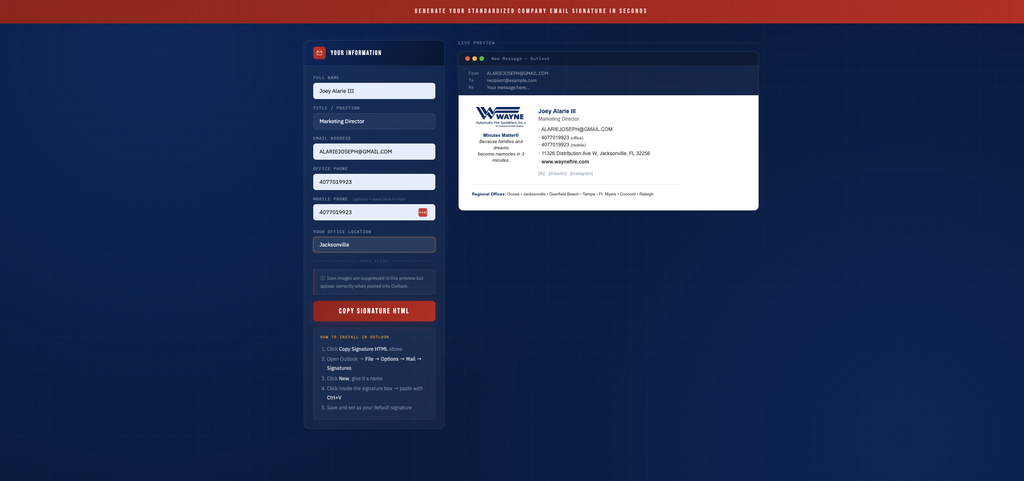
I used Claude to help build a simple interface where employees could enter their information and generate a personalized email signature using the approved company design.
The interface had two main sections.
On the left, employees could enter their contact information.
On the right, they could see a live preview of their signature.
As they updated the fields, the preview reflected their information.
Once everything looked correct, they could use the copy function to get the generated signature content.
The goal was simple.
Give employees a straightforward way to personalize their signatures without having to recreate the underlying design.
How the Generator Worked
Step 1: Start With an Approved Design
The client had already approved the email signature design.
That was important because I wasn’t asking AI to invent a new brand identity.
The design was established.
The generator’s job was to reproduce that design while allowing specific pieces of information to change.
This is a useful distinction when working with AI.
Sometimes you don’t need AI to make creative decisions.
You need it to help execute a clearly defined requirement.
Step 2: Create Fields for Employee Information
The generator included fields for the information that varied between employees.
Name, title, email, office phone, cell phone, and location.
Rather than editing HTML manually, employees could simply fill out a form.
The generator would then use those values to populate the signature template.
Step 3: Accommodate Seven Office Locations
The client operated across seven locations.
Instead of expecting employees to manually edit location information, the generator included a location field.
This made it easier to personalize the signature while preserving the approved layout.
For organizations with multiple offices, this kind of controlled input can reduce the amount of manual editing required.
Step 4: Display a Live Preview
One of my favorite parts of the tool was the live preview.
As employees entered their information, they could see how the signature would look.
This made the experience much more approachable than editing HTML code.
It also gave employees a chance to catch mistakes before copying the signature.
Step 5: Copy the Generated Signature
Once the employee entered their information, the generator provided a copy action.
From there, the employee could add the signature to their email client.
There is one important technical consideration here.
Outlook and Gmail have different signature editors, and HTML formatting doesn’t always transfer identically between email applications.
For that reason, a production rollout should test the copied signature in the actual email clients employees use.
The preferred experience is to let employees copy a rendered signature rather than requiring them to paste raw HTML source code into a rich-text editor.
Why I Used AI for This Project
The interesting part of this project wasn’t that Claude could help write code.
It was that AI made it practical to explore a custom solution to a problem that otherwise involved repetitive manual work.
I already understood what the client needed.
I knew what the approved design looked like.
And I understood the information that had to change between employees.
Claude helped me turn those requirements into a working generator.
This is one of the AI use cases I find most interesting as a digital marketer and agency owner.
Not generating more generic content.
Not adding AI to something just because it’s trendy.
But identifying a specific operational problem and building a tool to make that process easier.
What I’d Check Before Rolling This Out to 600 Employees
Building a generator is one part of the project.
Deploying it across an organization is another.
Before distributing a tool like this to hundreds of employees, I’d want to validate several things.
Email Client Compatibility
Test the signatures in the actual Outlook and Gmail versions the organization uses.
Check that fonts, spacing, images, links, and phone numbers display correctly.
Employee Instructions
Provide clear instructions for copying and installing the signature.
Employees shouldn’t need technical knowledge to use the generator.
Required Fields and Validation
Make sure email addresses and phone numbers are entered in a consistent format.
Consider whether some fields should be optional.
Brand Consistency
Employees should be able to personalize their contact information without accidentally changing the approved design.
Privacy and Security
Avoid collecting or storing unnecessary employee information.
If an AI development tool or external service is involved, review how any client information is handled.
Future Updates
Think about what happens if the company changes its logo, branding, or contact details.
A self-service generator can simplify signature creation, but it doesn’t automatically update signatures that employees have already installed.
For organizations that need centralized enforcement and updates, dedicated signature management software may still be a better solution.
The Bigger Lesson: Use AI to Solve Specific Problems
This project reminded me that some of the best opportunities to use AI aren’t particularly flashy.
An email signature generator isn’t going to change the world.
But it can turn an inconvenient, repetitive task into a much simpler process.
And that’s valuable.
I didn’t start this project by asking, “What can I build with AI?”
I started with a client problem.
The client needed a consistent design for hundreds of employees.
The manual approach didn’t make much sense.
So I explored a different way to get the job done.
That’s the kind of practical AI implementation I want to keep exploring through my work at DropShadow Agency.
Have a repetitive marketing or administrative task that’s taking more time than it should?
At DropShadow Agency, I help businesses improve their websites, marketing systems, and digital workflows.
If you have a process that could benefit from a simpler approach, let’s talk about what’s possible.